Weather CLI Application
Project Overview
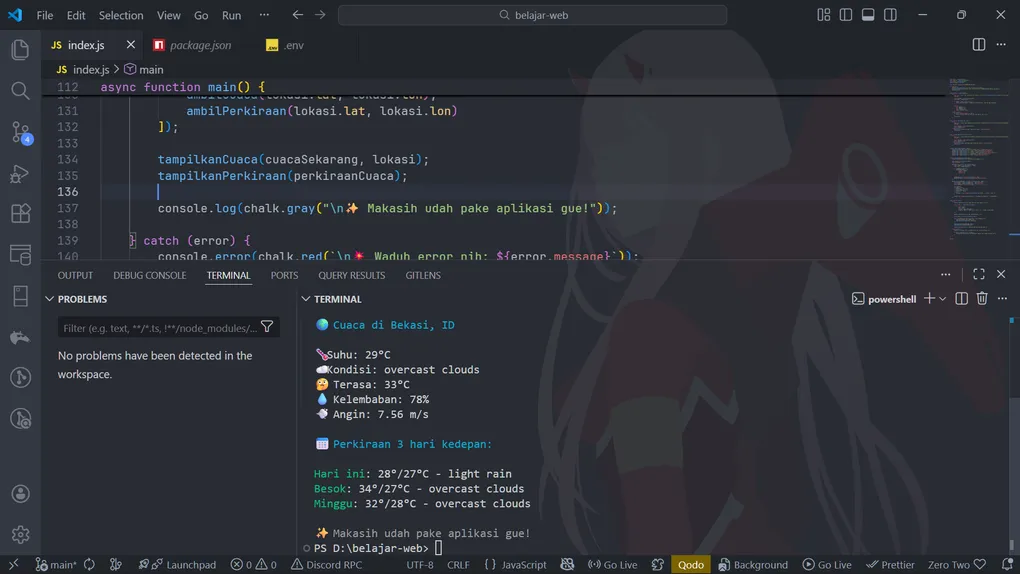
Weather CLI is a command-line interface (CLI) application to view real-time weather information and 3-day weather forecasts. This application uses the OpenWeatherMap API and provides results with attractive display using colors and emojis.
Tech Stack
| Technology | Purpose |
|---|---|
| Node.js | Runtime environment |
| axios | HTTP client for API requests |
| inquirer | Interactive CLI prompts |
| chalk | Colorful terminal output |
| dotenv | Environment variable management |
Project Structure
weather-cli/
├── index.js              # Main application file
├── .env                  # Environment variables (gitignore)
├── .env.example          # Example environment file
├── package.json          # Dependencies & scripts
└── README.md             # Project documentation
Installation & Setup
Prerequisites
- Node.js v12 or higher
- npm or yarn
- OpenWeatherMap API Key (free)
Step-by-Step Installation
1. Clone or Download Project
git clone https://github.com/BagasHtml/Weather-Cli.git
cd weather-cli
2. Initialize Node Project (if needed)
npm init -y3. Install Dependencies
npm install axios inquirer@8.2.5 chalk dotenvNote: We use inquirer@8.2.5 specifically to avoid compatibility issues with newer versions.
4. Setup API Key
a. Create a free account at OpenWeatherMap
b. Generate API key from your dashboard
c. Create .env file in the root folder:
touch .envd. Add your API key to .env:
OPENWEATHER_API_KEY=your_api_key_hereReplace your_api_key_here with your actual API key from OpenWeatherMap.
5. Run the Application
node index.jsCommon Errors & Solutions
❌ Error: “Cannot find module ‘axios/inquirer/chalk’”
Cause:
- Dependencies not installed
- npm install failed
Solution:
# Install all dependencies again
npm install axios inquirer@8.2.5 chalk dotenv

# Or install one by one
npm install axios
npm install inquirer@8.2.5
npm install chalk
npm install dotenv
❌ Error: “API key not set”
Cause:
.envfile doesn’t existOPENWEATHER_API_KEYnot defined in.env- Variable name is wrong
Solution:
# Create .env file with your API key
echo "OPENWEATHER_API_KEY=your_api_key_here" > .env

# Or edit manually
nano .env  # Linux/Mac
notepad .env  # Windows
❌ Error: “chalk.red is not a function”
Cause:
- Using wrong chalk syntax
- Incompatible chalk version
Solution:
- Use the provided fixed code from this documentation
- Ensure chalk syntax is:
chalk.red("text")notchalk.red”text”`
❌ Error: “inquirer.prompt is not a function”
Cause:
- Inquirer version is too new (9.0+)
- Compatibility issue with CommonJS
Solution:
# Install specific version that works with CommonJS
npm install inquirer@8.2.5
❌ Error: “City not found”
Cause:
- City name spelling is wrong
- City doesn’t exist in OpenWeatherMap database
- City name format is incorrect
Solution:
Correct spelling examples:
✓ Jakarta
✓ New York
✓ Tokyo
✓ London

Avoid:
✗ jakarta (use capital letter)
✗ nyc (use full name)
❌ Error: “API key is wrong”
Cause:
- API key is invalid
- API key has expired
- API key doesn’t have proper permissions
Solution:
- Regenerate API key from OpenWeatherMap dashboard
- Make sure API key is copied correctly without spaces
- Check that you’re using Free Tier
❌ Error: “Too many requests” (429 Error)
Cause:
- Too many requests in a short time
- OpenWeatherMap rate limit exceeded
- Free tier has a limit of 60 requests/minute
Solution:
- Wait a few seconds before making another request
- Upgrade to paid plan if you need more requests
- Add request throttling in your code
Features
1. Search Weather by City
- User-friendly CLI prompt
- Auto-validation
- Support for cities worldwide
2. Current Weather Display
- 🌡️ Current temperature (Celsius)
- ☁️ Weather condition
- 🤔 Feels like temperature
- 💧 Humidity level
- 💨 Wind speed
3. 3-Day Forecast
- Weather forecast for next 3 days
- Maximum and minimum temperature per day
- Expected weather condition
- Local date format (Indonesia)
4. Colorful Terminal Output
- Different colors for each information type
- Emojis for better visualization
- User-friendly messages
Usage Guide
Running the Application
node index.jsApplication Flow
1. Application displays welcome message
   🌤️ Hello! What city's weather do you want to check?

2. Enter city name
   ? Enter city name: Jakarta

3. Application fetches data
   🔍 Searching for data...

4. Display current weather information
   🌍 Weather in Jakarta, ID
   🌡️ Temperature: 28°C
   ☁️ Condition: Partly cloudy
   ... (other info)

5. Display 3-day forecast
   📅 Weather forecast for next 3 days:
   Today: 30°/24°C - Partly cloudy
   Tomorrow: 29°/23°C - Rainy
   ... (other info)

6. Application ends with thank you message
   ✨ Thanks for using my app!
Example Cities to Search
Domestic Cities:
- Jakarta
- Bandung
- Surabaya
- Yogyakarta

International Cities:
- New York
- London
- Tokyo
- Singapore
- Paris
- Sydney
Code Explanation
Main Functions
cariKota(namaKota) - Search City
- Searches for location coordinates using Geo API
- Parameter: city name (string)
- Returns: object with lat, lon, name, country
- Error handling for city not found
ambilCuaca(lat, lon) - Get Current Weather
- Fetches current weather data
- Parameters: latitude and longitude
- Returns: object with all weather data
- Uses units=metric for Celsius
ambilPerkiraan(lat, lon) - Get Forecast
- Fetches weather forecast data
- Parameters: latitude and longitude
- Returns: object with forecast data
- Data for 5 days (120 hours)
tampilkanCuaca(cuaca, lokasi) - Display Current Weather
- Format and display current weather
- Uses chalk for colors
- Uses emojis for visual appeal
tampilkanPerkiraan(perkiraan) - Display Forecast
- Format and display 3-day forecast
- Group data by day
- Calculate min/max temperature per day
main() - Main Function
- Orchestrate all processes
- Prompt user for input
- Handle errors gracefully
- Use try-catch for error handling
Dependencies Explanation
axios
HTTP client for making API requests
const axios = require("axios");

// Usage:
const response = await axios.get(url);
const data = response.data;
inquirer
Interactive command-line prompts
const inquirer = require("inquirer");

// Usage:
const { kota } = await inquirer.prompt([
    {
        type: "input",
        name: "kota",
        message: "Enter city name:"
    }
]);
chalk
Colorful terminal output
const chalk = require("chalk");

// Usage:
console.log(chalk.red("Error message"));
console.log(chalk.blue("Info message"));
console.log(chalk.yellow("Warning message"));
console.log(chalk.green("Success message"));
dotenv
Load environment variables from .env file
require('dotenv').config();

// Usage:
const API_KEY = process.env.OPENWEATHER_API_KEY;
Environment Variables
.env File Format
OPENWEATHER_API_KEY=your_api_key_here.env.example (for sharing)
OPENWEATHER_API_KEY=Best Practices
- ✓ Never push
.envto git (add to.gitignore) - ✓ Use
.env.exampleas a template - ✓ Keep API key secret
- ✓ Use strong password for OpenWeatherMap account
- ✓ Regenerate key if exposed
API Integration
OpenWeatherMap APIs Used
1. Geo API (Location)
GET /geo/1.0/direct?q={city}&limit=1&appid={API_KEY}- Converts city name to coordinates
- Accuracy: ±1km
2. Current Weather API
GET /data/2.5/weather?lat={lat}&lon={lon}&units=metric&appid={API_KEY}- Real-time weather data
- Updates every 10 minutes
3. Forecast API
GET /data/2.5/forecast?lat={lat}&lon={lon}&units=metric&appid={API_KEY}- 5-day weather forecast
- Resolution: 3 hours
Terminal Output Examples
Success Output
🌤️ Hello! What city's weather do you want to check?

? Enter city name: Jakarta
🔍 Searching for data...

🌍 Weather in Jakarta, ID

🌡️ Temperature: 28°C
☁️ Condition: scattered clouds
🤔 Feels like: 31°C
💧 Humidity: 65%
💨 Wind: 3.5 m/s

📅 Weather forecast for next 3 days:

Today: 30°/24°C - Partly cloudy
Tomorrow: 29°/23°C - Rainy
Monday: 28°/22°C - Clear sky

✨ Thanks for using my app!
Error Output
❌ Hey! API key is not set!
Set up .env file with: OPENWEATHER_API_KEY=your_api_key

💥 Error: City "xyz" not found bro
Performance Optimization
Current Implementation
- ✓ Parallel requests using
Promise.all() - ✓ Efficient data filtering
- ✓ Minimal API calls
Potential Improvements
- Add caching to reduce API calls
- Implement rate limiting
- Add logging for debugging
- Support multiple cities search
- Add weather alerts
Security Considerations
✅ Best Practices
- Keep API key in environment variables
- Never commit
.envfile to git - Use HTTPS for API calls
- Validate user input before API request
🔒 Environment Variable Security
# Good practice
export OPENWEATHER_API_KEY="your_key"

# Bad practice
OPENWEATHER_API_KEY="your_key"  # In source code
Troubleshooting Checklist
- API key generated from OpenWeatherMap
-
.envfile created correctly - All dependencies installed (
npm install) -
.envfile is in root folder (not in subfolder) - City name spelled correctly (capitalize first letter)
- Internet connection is active
- API key is not expired
- Rate limit not exceeded
Future Features
- Support multiple locations
- Weather alerts
- Historical weather data
- Air quality index
- UV index
- Sunrise/sunset times
- Save favorite cities
- Weather comparison between cities
Package.json Template
{
  "name": "weather-cli",
  "version": "1.0.0",
  "description": "CLI application to check real-time weather",
  "main": "index.js",
  "type": "commonjs",
  "scripts": {
    "start": "node index.js"
  },
  "dependencies": {
    "axios": "^1.6.0",
    "inquirer": "^8.2.5",
    "chalk": "^4.1.2",
    "dotenv": "^16.0.0"
  }
}
Getting Your OpenWeatherMap API Key
Free Account Benefits
- ✓ Up to 60 requests per minute
- ✓ Current weather data
- ✓ 5-day forecast
- ✓ No credit card required
- ✓ No time limit
How to Get API Key
- Visit OpenWeatherMap API
- Click “Sign Up”
- Fill in email and password
- Verify your email
- Login to your account
- Go to “API Keys” section
- Copy your “Default API Key”
- Add to your
.envfile
License & Credits
- API: OpenWeatherMap
- CLI Framework: Inquirer.js
- Styling: Chalk
- HTTP Client: Axios
- Environment: dotenv
Support & Feedback
If you encounter any issues or have questions:
- Check this documentation first
- Review the error message carefully
- Verify your API key and internet connection
- Reinstall dependencies if needed:
npm install - Check the Troubleshooting Checklist
Version History
v1.0.0 (Current)
- Initial release
- Current weather display
- 3-day forecast
- City search functionality
- Colorful CLI output
- Error handling
Glossary
| Term | Definition |
|---|---|
| API Key | Unique identifier for API access |
| CLI | Command-Line Interface |
| Forecast | Predicted weather for future days |
| Geo API | Geolocation API for coordinates |
| Latitude | Horizontal map coordinate (North-South) |
| Longitude | Vertical map coordinate (East-West) |
| Rate Limit | Maximum requests allowed per time period |
| Environment Variables | Configuration values stored outside code |