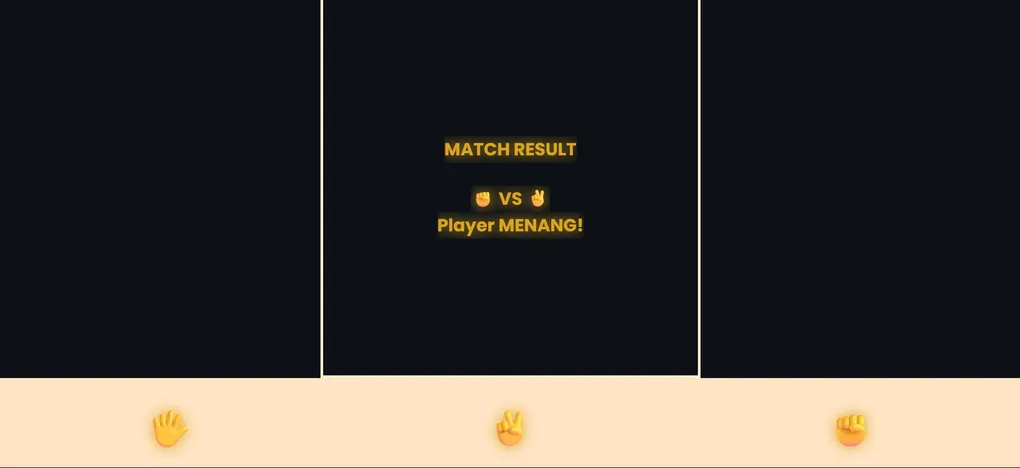
Simple Game Rock Paper Scissors
Table of Contents
- Project Overview
- Features
- Technology Stack
- Installation & Setup
- Project Structure
- How to Play
- Game Rules
- Code Explanation
- Features in Detail
- Customization Guide
- Deployment
- Troubleshooting
Project Overview
Simple Game Rock Paper Scissors is an interactive web-based Rock, Paper, Scissors game built with vanilla HTML, CSS, and JavaScript. The game features a clean user interface where players can click buttons to make their choice, and the computer opponent will automatically generate a random selection. The game tracks scores and displays results in real-time.
This project is perfect for beginners learning front-end development, as it demonstrates fundamental concepts like DOM manipulation, event listeners, and game logic implementation.
Live Demo: game-suit-simple.vercel.app
Features
- Simple & Intuitive Interface: Easy-to-understand gameplay with clear visual feedback
- Player vs Computer: Play against an AI opponent with random choices
- Score Tracking: Automatic score calculation and display
- Responsive Design: Works on desktop, tablet, and mobile devices
- Visual Feedback: Clear display of player choice, computer choice, and game result
- Reset Functionality: Ability to restart the game and reset scores
- No Dependencies: Pure vanilla JavaScript, HTML, and CSS - no frameworks required
- Fast Gameplay: Instant result calculation and display
- User-Friendly: Simple click-based controls
Technology Stack
| Technology | Purpose |
|---|---|
| HTML5 | Semantic markup and structure |
| CSS3 | Styling, layout, and responsive design |
| Vanilla JavaScript | Game logic and interactivity |
| Vercel | Hosting and deployment |
Installation & Setup
Option 1: Local Development
Step 1: Clone the Repository
git clone https://github.com/BagasHtml/Game-suit-simple.git
cd Game-suit-simple
Step 2: Open in Browser
Simply open the index.html file in your web browser:
# Using Python (Python 3)
python -m http.server 8000

# Using Node.js (with http-server installed)
npx http-server

# Or directly open in browser
open index.html
Step 3: Start Playing
Navigate to http://localhost:8000 in your browser and enjoy!
Option 2: Online Play
Visit the live demo: game-suit-simple.vercel.app
Project Structure
Game-suit-simple/
├── index.html          # Main HTML file with game structure
├── index.css           # Styling and layout
├── index.js            # Game logic and interactivity
└── README.md           # Project information
File Descriptions
index.html
- Contains the DOM structure for the game
- Defines buttons for Rock, Paper, and Scissors choices
- Displays player choice, computer choice, and results
- Score display elements
index.css
- Responsive layout design
- Button styling and hover effects
- Result display styling
- Mobile-friendly media queries
index.js
- Game logic implementation
- Event listener management
- Score tracking
- Result calculation (win/lose/draw)
- Computer choice generation
How to Play
- Start the Game: Open the game in your browser
- Choose Your Move: Click one of three buttons:
- 🪨 Rock (Batu)
- 📄 Paper (Kertas)
- ✂️ Scissors (Gunting)
- Computer Plays: The computer automatically selects a random choice
- View Result: See the outcome (Win/Lose/Draw) and score update
- Play Again: Continue clicking buttons to play multiple rounds
- Reset Score (Optional): Click reset button to start over with 0-0 score
Game Rules
The game follows standard Rock-Paper-Scissors rules:
| Your Choice | Beats | Loses To |
|---|---|---|
| Rock 🪨 | Scissors | Paper |
| Paper 📄 | Rock | Scissors |
| Scissors ✂️ | Paper | Rock |
Winning Conditions:
- You Win: Your choice beats the computer’s choice
- Computer Wins: Computer’s choice beats yours
- Draw: Both make the same choice
Score Tracking:
- Your wins are counted on the left score
- Computer wins are counted on the right score
- Draws do not affect the score
Code Explanation
HTML Structure
<!-- Game Container -->
<div class="game-container">
  <!-- Choice Buttons -->
  <button id="rock">Rock</button>
  <button id="paper">Paper</button>
  <button id="scissors">Scissors</button>

  <!-- Display Results -->
  <div id="result"></div>

  <!-- Score Display -->
  <div id="score">0 - 0</div>
</div>
JavaScript Game Logic
Computer Choice Generation:
function getComputerChoice() {
  const choices = ['rock', 'paper', 'scissors'];
  return choices[Math.floor(Math.random() * 3)];
}
Result Determination:
function determineWinner(playerChoice, computerChoice) {
  if (playerChoice === computerChoice) return 'draw';

  if (playerChoice === 'rock' && computerChoice === 'scissors') return 'win';
  if (playerChoice === 'paper' && computerChoice === 'rock') return 'win';
  if (playerChoice === 'scissors' && computerChoice === 'paper') return 'win';

  return 'lose';
}
Event Listeners:
document.getElementById('rock').addEventListener('click', () => {
  playGame('rock');
});
// Same for paper and scissors
CSS Styling
Responsive Layout:
- Flexbox for centered alignment
- Media queries for mobile devices
- Hover effects for better interactivity
- Smooth transitions and animations
Features in Detail
1. Choice Buttons
- Three clickable buttons representing Rock, Paper, and Scissors
- Hover effect to show interactivity
- Click events trigger game logic
2. Computer AI
- Random selection from three options
- Uses
Math.random()for unpredictability - Equal probability for each choice
3. Result Display
- Shows player’s choice and computer’s choice
- Displays game outcome (Win/Lose/Draw)
- Color-coded results (green for win, red for lose, yellow for draw)
4. Score Counter
- Tracks total wins for player and computer
- Updates after each round
- Displays in format: “Player Score - Computer Score”
5. Game Reset (Optional Feature)
- Reset button to clear scores
- Maintains gameplay state
Customization Guide
Change Button Labels
Edit index.html to change button text:
<button id="rock">Rock (Batu)</button>
<button id="paper">Paper (Kertas)</button>
<button id="scissors">Scissors (Gunting)</button>
Modify Styling
Update colors in index.css:
button {
  background-color: #3498db; /* Change button color */
  color: white;
}

.win {
  color: #2ecc71; /* Win color - Green */
}

.lose {
  color: #e74c3c; /* Lose color - Red */
}

.draw {
  color: #f39c12; /* Draw color - Yellow */
}
Add Sound Effects
Include audio elements in index.js:
const winSound = new Audio('win.mp3');
const loseSound = new Audio('lose.mp3');

function playGame(playerChoice) {
  // ... game logic ...
  if (result === 'win') winSound.play();
}
Add Animations
Enhance CSS with keyframe animations:
@keyframes slideIn {
  from { opacity: 0; transform: translateY(-10px); }
  to { opacity: 1; transform: translateY(0); }
}

.result {
  animation: slideIn 0.3s ease-in;
}
Add Difficulty Levels
Modify the computer choice logic:
function getComputerChoice(difficulty) {
  if (difficulty === 'easy') {
    return ['rock', 'paper', 'scissors'][Math.floor(Math.random() * 3)];
  }
  // Custom AI logic for other difficulties
}
Deployment
Deploy to Vercel (Recommended)
Step 1: Push to GitHub
git add .
git commit -m "Initial commit"
git push origin main
Step 2: Connect to Vercel
- Go to vercel.com
- Click “New Project”
- Select your GitHub repository
- Click “Deploy”
Step 3: Your site is live!
- Automatic deployments on every push
- Custom domain support
- SSL certificate included
Deploy to GitHub Pages
Step 1: Update repository settings
- Go to Settings → Pages
- Select “main” branch as source
- Save
Step 2: Access your site
- Your game will be available at:
https://username.github.io/Game-suit-simple
Troubleshooting
Game Not Loading
- Problem: Page shows blank or errors
- Solution:
- Check browser console for JavaScript errors (F12)
- Ensure all three files (HTML, CSS, JS) are in same directory
- Clear browser cache and reload
Buttons Not Working
- Problem: Clicking buttons does nothing
- Solution:
- Check JavaScript file is properly linked in HTML
- Verify button IDs match in HTML and JavaScript
- Check browser console for error messages
Score Not Updating
- Problem: Score displays but doesn’t change
- Solution:
- Verify score variables are properly defined
- Check update function is called after each round
- Inspect browser console for errors
Styling Issues
- Problem: Layout looks broken or misaligned
- Solution:
- Hard refresh browser (Ctrl+F5 or Cmd+Shift+R)
- Clear browser cache
- Check CSS file is properly linked
- Test in different browser
Mobile Display Problems
- Problem: Game doesn’t display correctly on mobile
- Solution:
- Ensure viewport meta tag is in HTML:
<meta name="viewport" content="width=device-width, initial-scale=1.0"> - Check media queries in CSS
- Test with mobile browser developer tools
- Ensure viewport meta tag is in HTML:
Best Practices
- Use Semantic HTML: Structure should be clear and meaningful
- Keep CSS DRY: Use classes to avoid repetition
- Optimize JavaScript: Use event delegation for multiple buttons
- Responsive First: Design for mobile first, then enhance for larger screens
- Accessibility: Add ARIA labels for screen readers
- Performance: Minimize DOM manipulation and reflows
- Clean Code: Use meaningful variable names and add comments
- User Feedback: Provide clear visual feedback for all interactions
Learning Resources
- MDN Web Docs - JavaScript Basics
- CSS Tricks - Flexbox Guide
- HTML5 Documentation
- JavaScript Event Listeners
Contributing
To contribute improvements to this project:
- Fork the repository
- Create a feature branch (
git checkout -b feature/improvement) - Make your changes
- Commit your changes (
git commit -m 'Add improvement') - Push to the branch (
git push origin feature/improvement) - Open a Pull Request
License
This project is open-source and available under the MIT License.
Support
- Original Repository: BagasHtml/Game-suit-simple
- Live Demo: game-suit-simple.vercel.app
- Issues: Report bugs on GitHub Issues page
Author
Created by BagasHtml
Don’t forget to follow on GitHub and give it a star! ⭐