Rest API Waste Management
🚛 Waste Management Prediction API - Complete Technical Documentation





Advanced REST API untuk Sistem Prediksi Limbah (Waste Management) menggunakan Next.js 16, Prisma ORM, dan TiDB Database. Dibangun untuk kompetisi dengan fokus pada performa, skalabilitas, dan akurasi prediksi berbasis AI.
📋 Table of Contents
- Project Overview
- Technology Stack
- Project Architecture
- Folder Structure
- Database Schema
- API Endpoints
- Code Implementation
- Setup & Installation
- Development Guide
- Deployment
🎯 Project Overview
Waste Management Prediction API adalah sistem backend yang dirancang untuk memprediksi volume limbah berdasarkan lokasi dan jumlah pengunjung di berbagai area (JIS, GBK, Stadiun, dll).
Fitur Utama:
✅ AI-Driven Waste Prediction - Integrasi AI service untuk estimasi volume sampah
✅ Dynamic Logistics Calculation - Perhitungan otomatis kebutuhan truk, personel, dan jam kerja
✅ TiDB Integration - Database MySQL-compatible yang terukur dan reliable
✅ Prisma ORM - Type-safe database queries dengan TypeScript
✅ Next.js API Routes - REST API dengan App Router modern
✅ Hybrid Logic System - Mode AI untuk lokasi terdaftar, fallback untuk lokasi baru
✅ Spatial Data Support - Koordinat GPS untuk integrasi peta
✅ Production Ready - Error handling, logging, dan best practices
Use Cases:
📍 Dinas Lingkungan Hidup (DLH) - Prediksi volume limbah per lokasi
🗑️ Event Management - Estimasi sampah untuk acara besar
🚛 Fleet Planning - Optimasi armada dan personel operasional
📊 Data Analytics - Historical logs untuk trend analysis
🛠️ Technology Stack
| Layer | Technology | Version | Purpose |
|---|---|---|---|
| Runtime | Node.js | 18+ | JavaScript runtime |
| Framework | Next.js | 16.2.6 | React + API routes |
| Language | TypeScript | 5 | Type safety |
| Database | TiDB (MySQL) | Latest | Data persistence |
| ORM | Prisma | 5.22.0 | Database abstraction |
| Styling | Tailwind CSS | 4 | UI components (optional) |
| Linting | ESLint | 9 | Code quality |
| Package Manager | npm | 10+ | Dependency management |
| Deployment | Vercel | Latest | Serverless hosting |
Dependencies Breakdown:
Production Dependencies:
{
  "@prisma/client": "^5.22.0",      // Database client
  "dotenv": "^17.4.2",              // Environment variables
  "next": "16.2.6",                 // Web framework
  "react": "19.2.4",                // UI library
  "react-dom": "19.2.4"             // React DOM
}
Development Dependencies:
{
  "@tailwindcss/postcss": "^4",     // CSS framework
  "@types/*": "^20/19",             // TypeScript definitions
  "eslint": "^9",                   // Linter
  "eslint-config-next": "16.2.6",   // Next.js linting rules
  "prisma": "^5.22.0",              // Migration tools
  "typescript": "^5"                // TypeScript compiler
}
🏗️ Project Architecture
System Flow Diagram
┌─────────────────────────────────────────────────────────────┐
│                     Client/Frontend                          │
│                  (External Application)                      │
└──────────────────────────┬──────────────────────────────────┘
                           │
                    POST /api/waste
                    (JSON Payload)
                           │
                           ▼
┌─────────────────────────────────────────────────────────────┐
│               Next.js API Route Handler                      │
│         (app/api/waste/route.ts - POST Method)              │
│                                                              │
│  1. Validate Input (nama_lokasi)                           │
│  2. Call AI Service (Hugging Face / External API)          │
│  3. Process Results                                         │
│  4. Query/Create Area in Database                          │
│  5. Log Prediction to PredictionLog                        │
│  6. Format & Return JSON Response                          │
└──────────────────┬───────────────────────┬──────────────────┘
                   │                       │
        ┌──────────▼──────────┐   ┌────────▼─────────┐
        │                     │   │                  │
        │  AI Service API     │   │  TiDB Database   │
        │  (Prediction)       │   │  (Prisma Client) │
        │                     │   │                  │
        │ - Volume Ton        │   │ - MasterArea     │
        │ - Food Waste Ton    │   │ - PredictionLog  │
        │ - Plastic Ton       │   │ - FleetInventory │
        │ - Confidence        │   │ - TPA Facility   │
        │                     │   │                  │
        └─────────────────────┘   └──────────────────┘
Data Flow:
- Input Validation → Memastikan
nama_lokasiada - AI Integration → Memanggil AI service untuk prediksi
- Database Query → Cari area di MasterArea table
- Data Creation → Buat entry baru jika area belum terdaftar
- Log Storage → Simpan hasil prediksi ke PredictionLog
- Response Formatting → Format dan return JSON response
📁 Folder Structure
rest_api/
├── 📂 app/                          # Next.js App Router directory
│   ├── 📂 api/                      # API Routes (Next.js 13+)
│   │   └── 📂 waste/                # Waste prediction endpoint
│   │       └── route.ts             # POST /api/waste handler
│   │
│   ├── 📂 lib/                      # Utility & Library Files
│   │   ├── prisma.ts                # Prisma client singleton
│   │   └── waste-api.ts             # AI Service integration
│   │
│   ├── favicon.ico                  # Website favicon
│   ├── globals.css                  # Global styles
│   ├── layout.tsx                   # Root layout component
│   └── page.tsx                     # Home page (GET /)
│
├── 📂 prisma/                       # Prisma ORM Configuration
│   └── schema.prisma                # Database schema definition
│
├── 📂 public/                       # Static assets
│   └── (images, icons, etc.)
│
├── 📄 package.json                  # Project dependencies
├── 📄 tsconfig.json                 # TypeScript configuration
├── 📄 next.config.ts                # Next.js configuration
├── 📄 eslint.config.mjs             # ESLint rules
├── 📄 postcss.config.mjs            # PostCSS configuration
├── 📄 .env.example                  # Environment template
├── 📄 .gitignore                    # Git ignore rules
└── 📄 README.md                     # Project documentation
Detailed Folder Explanation:
📂 app/ - Next.js App Router
Direktori utama Next.js 13+ untuk routes dan layouts.
- Menggunakan file-based routing
- Supports Server Components (default)
- Supports API Routes dengan route.ts
📂 app/api/ - API Routes
Lokasi endpoint REST API.
- Menggunakan struktur folder sesuai URL path
- Setiap folder dengan route.ts = 1 endpoint
- Contoh: app/api/waste/route.ts → POST /api/waste
📂 app/lib/ - Utility Functions
Reusable utility dan service functions:
- prisma.ts  → Singleton Prisma client
- waste-api.ts → AI service integration
📂 prisma/ - Database Configuration
Prisma ORM configuration dan schema:
- schema.prisma → Database models & relationships
- migrations/ → Database version history (auto-generated)
📊 Database Schema
Models Overview
┌─────────────────────────────────────────────────────────┐
│                    Database Models                      │
├─────────────────────────────────────────────────────────┤
│                                                          │
│  ┌─── MasterArea ───────────┐    ┌─ PredictionLog ┐    │
│  │ id (PK)                  │◄──┤ id (PK)        │    │
│  │ name (String, UNIQUE)    │   │ areaId (FK) ──┘    │
│  │ latitude (Float)         │   │ prediction_date    │
│  │ longitude (Float)        │   │ volume_ton         │
│  │ [relationships]          │   │ confidence_score   │
│  │ - predictions (1:N)      │   │ risk_status        │
│  │ - permits (1:N)          │   │ created_at         │
│  └──────────────────────────┘   └────────────────────┘
│
│  ┌─── CrowdPermit ──────────┐    ┌─ TpaFacility ──┐   │
│  │ id (PK)                  │    │ id (PK)        │   │
│  │ areaId (FK) ────┐        │    │ name (String)  │   │
│  │ event_name      │◄────────    │ max_capacity_  │   │
│  │ event_date      │             │ ton (Float)    │   │
│  │ estimated_crowd │             │ current_load_  │   │
│  │ status          │             │ ton (Float)    │   │
│  └──────────────────────────┘    └────────────────┘   │
│
│  ┌─ OperationalParam ──┐  ┌─ FleetInventory ──┐      │
│  │ param_key (PK)      │  │ id (PK)            │      │
│  │ param_value (Float) │  │ truck_type         │      │
│  └─────────────────────┘  │ total_units        │      │
│                           │ ready_units        │      │
│                           │ capacity_per_truck │      │
│                           └────────────────────┘      │
└─────────────────────────────────────────────────────────┘
Model Details:
1️⃣ MasterArea - Daftar Lokasi/Area
model MasterArea {
  id          Int             @id @default(autoincrement())
  name        String          @unique
  latitude    Float
  longitude   Float
  predictions PredictionLog[]
  permits     CrowdPermit[]
}
Purpose: Menyimpan daftar area/lokasi yang bisa diprediksi
Fields:
id- Auto-increment primary keyname- Nama unik area (contoh: “jis”, “gbk”)latitude- Koordinat lintang untuk pemetaanlongitude- Koordinat bujur untuk pemetaanpredictions- Relasi ke PredictionLog (1:N)permits- Relasi ke CrowdPermit (1:N)
Example Data:
{
  "id": 1,
  "name": "jis",
  "latitude": -6.1214,
  "longitude": 106.8830
}
2️⃣ PredictionLog - Riwayat Prediksi
model PredictionLog {
  id               Int        @id @default(autoincrement())
  areaId           Int
  area             MasterArea @relation(fields: [areaId], references: [id])
  prediction_date  DateTime
  volume_ton       Float
  confidence_score Float
  risk_status      String
  created_at       DateTime   @default(now())
}
Purpose: Menyimpan setiap prediksi yang dilakukan untuk audit trail
Fields:
id- Auto-increment primary keyareaId- Foreign key ke MasterAreaprediction_date- Tanggal prediksi dilakukanvolume_ton- Total volume limbah (ton)confidence_score- Akurasi prediksi AI (0-100 atau 0-1)risk_status- Level risiko (HIGH, MEDIUM, LOW)created_at- Timestamp otomatis saat dibuat
Example Data:
{
  "id": 1,
  "areaId": 1,
  "prediction_date": "2026-05-12T10:30:45Z",
  "volume_ton": 12.5,
  "confidence_score": 0.85,
  "risk_status": "MEDIUM",
  "created_at": "2026-05-12T10:30:45Z"
}
3️⃣ CrowdPermit - Izin Event Keramaian
model CrowdPermit {
  id              Int        @id @default(autoincrement())
  areaId          Int
  area            MasterArea @relation(fields: [areaId], references: [id])
  event_name      String
  event_date      DateTime
  estimated_crowd Int
  status          String     @default("PENDING")
}
Purpose: Tracking event khusus dan estimasi keramaian
Fields:
id- Auto-increment primary keyareaId- Foreign key ke MasterAreaevent_name- Nama event/acaraevent_date- Tanggal event berlangsungestimated_crowd- Estimasi jumlah pengunjungstatus- Status izin (PENDING, APPROVED, REJECTED)
4️⃣ TpaFacility - Fasilitas TPA (Tempat Pembuangan Akhir)
model TpaFacility {
  id               Int    @id @default(autoincrement())
  name             String
  max_capacity_ton Float
  current_load_ton Float
}
Purpose: Data kapasitas TPA untuk memastikan tidak overload
Fields:
id- Auto-increment primary keyname- Nama TPAmax_capacity_ton- Kapasitas maksimal (ton)current_load_ton- Beban saat ini (ton)
5️⃣ OperationalParam - Parameter Operasional
model OperationalParam {
  param_key   String @id
  param_value Float
}
Purpose: Menyimpan konstanta operasional yang bisa diubah
Fields:
param_key- Nama parameter (contoh: “CAPACITY_PER_TRUCK”)param_value- Nilai float dari parameter
Contoh Nilai:
CAPACITY_PER_TRUCK = 5.0        // 5 m³ per truk
WEIGHT_CONVERSION = 0.4         // 1 m³ = 0.4 ton
STAFF_PER_TRUCK = 3             // 3 orang per truk
SHIFT_HOURS = 8                 // 8 jam kerja
6️⃣ FleetInventory - Inventaris Armada
model FleetInventory {
  id                     Int    @id @default(autoincrement())
  truck_type             String
  total_units            Int
  ready_units            Int
  capacity_per_truck_ton Float
}
Purpose: Tracking armada truk yang tersedia
Fields:
id- Auto-increment primary keytruck_type- Tipe truk (Compactor, Dump Truck, dll)total_units- Total unit yang adaready_units- Unit siap operasionalcapacity_per_truck_ton- Kapasitas per truk (ton)
🔌 API Endpoints
Endpoint Overview
| Method | Endpoint | Description | Auth | Status |
|---|---|---|---|---|
GET | / | Home page info | ❌ | ✅ Active |
POST | /api/waste | Waste prediction | ❌ | ✅ Active |
POST /api/waste - Waste Prediction
Request Format
POST /api/waste HTTP/1.1
Host: your-api.vercel.app
Content-Type: application/json
Request Body
{
  "nama_lokasi": "JIS",
  "visitor_count": 80000,
  "event_name": "Concert XYZ"
}
Required Fields:
| Field | Type | Description |
|---|---|---|
nama_lokasi | String | Nama lokasi (Required) |
visitor_count | Integer | Estimasi pengunjung (Optional) |
event_name | String | Nama event (Optional) |
Response Format (Success - 200 OK)
{
  "status": "success",
  "message": "Prediction completed successfully",
  "confidence_score": 0.85,
  "generated_at": "2026-05-12T10:30:45.123Z",
  "data": {
    "location": "JIS",
    "is_area_registered": true,
    "coordinates": {
      "lat": -6.1214,
      "lng": 106.8830
    },
    "waste_summary": {
      "total_volume_ton": 12.5,
      "total_food_waste_ton": 8.3,
      "total_plastic_ton": 2.1
    },
    "prediction_results": [
      {
        "tanggal": "2026-05-12",
        "lokasi": "JIS",
        "total_volume_ton": 12.5,
        "sisa_makanan_ton": 8.3,
        "plastik_ton": 2.1,
        "rekomendasi_truk": 3,
        "calculated_staff": 9,
        "man_hours": 72,
        "weight_kg": 12500,
        "status_risiko": "SAFE ✅",
        "info_event": "Concert XYZ"
      }
    ],
    "logistics_plan": {},
    "database_log": {
      "id": 1,
      "areaId": 1,
      "prediction_date": "2026-05-12T10:30:45.123Z",
      "volume_ton": 12.5,
      "confidence_score": 0.85,
      "risk_status": "MEDIUM",
      "created_at": "2026-05-12T10:30:45.123Z"
    }
  }
}
Response Format (Error - 400/500)
{
  "status": "error",
  "message": "Properti 'nama_lokasi' wajib diisi."
}
HTTP Status Codes
| Code | Meaning | Scenario |
|---|---|---|
| 200 | Success | Prediksi berhasil dilakukan |
| 400 | Bad Request | nama_lokasi tidak diisi |
| 500 | Server Error | Error di AI service atau database |
cURL Examples
Success Request:
curl -X POST http://localhost:3000/api/waste \
  -H "Content-Type: application/json" \
  -d '{
    "nama_lokasi": "JIS",
    "visitor_count": 80000
  }'
Error Request (Missing Field):
curl -X POST http://localhost:3000/api/waste \
  -H "Content-Type: application/json" \
  -d '{
    "visitor_count": 80000
  }'
💻 Code Implementation
1️⃣ app/lib/prisma.ts - Database Client
import { PrismaClient } from "@prisma/client";

const globalForPrisma = globalThis as unknown as {
  prisma: PrismaClient | undefined;
};

export const prisma =
  globalForPrisma.prisma ??
  new PrismaClient();

if (process.env.NODE_ENV !== 'production')
  globalForPrisma.prisma = prisma;

export default prisma;
Purpose: Singleton pattern untuk Prisma Client
Why Singleton?
- Menghindari multiple database connections
- Reuse koneksi yang sama across requests
- Lebih efficient di serverless environment
Penggunaan:
import { prisma } from "@/app/lib/prisma";

// Query database
const area = await prisma.masterArea.findFirst({...});
2️⃣ app/lib/waste-api.ts - AI Service Integration
class WastePredictionService {
  private static instance: WastePredictionService;
  private readonly apiUrl: string;

  private constructor() {
    this.apiUrl = process.env.API_URL || "";
  }

  public static getInstance(): WastePredictionService {
    if (!WastePredictionService.instance) {
      WastePredictionService.instance = new WastePredictionService();
    }
    return WastePredictionService.instance;
  }

  async predict(payload: Record<string, any>) {
    const response = await fetch(this.apiUrl, {
      method: "POST",
      headers: {
        "Content-Type": "application/json"
      },
      body: JSON.stringify(payload),
      cache: "no-store",
    });

    if (!response.ok) {
      const errorText = await response.text();
      throw new Error(`AI API Error: ${response.status} - ${errorText}`);
    }

    return response.json();
  }
}

export const wasteService = WastePredictionService.getInstance();
Pattern: Singleton Design Pattern
Features:
- Private constructor mencegah multiple instances
- Static getInstance() mengembalikan instance yang sama
- Reusable across entire application
Penggunaan:
import { wasteService } from "@/app/lib/waste-api";

// Call AI service
const aiData = await wasteService.predict({
  nama_lokasi: "JIS",
  visitor_count: 80000
});
3️⃣ app/api/waste/route.ts - Main API Handler
A. Header & Setup
export const dynamic = 'force-dynamic';

import { NextResponse } from "next/server";
import { wasteService } from "../../lib/waste-api";
import { prisma } from "../../lib/prisma";

const DEFAULT_COORDINATES = { lat: -6.2088, lng: 106.8456 };
export const dynamic = 'force-dynamic' - Force dynamic rendering (tidak cache)
B. Handler Function
export async function POST(req: Request) {
  try {
    // Step 1: Parse request body
    const body = await req.json().catch(() => ({}));

    // Step 2: Validate input
    if (!body.nama_lokasi) {
      return NextResponse.json(
        { status: "error", message: "Properti 'nama_lokasi' wajib diisi." },
        { status: 400 }
      );
    }

    // Step 3: Call AI service
    const aiData = await wasteService.predict(body);

    // Step 4: Extract location name
    const aiLocationName = aiData.data?.prediction_results?.[0]?.lokasi
      || body.nama_lokasi
      || "Unknown";
    const normalizedLocation = aiLocationName.toLowerCase().trim();

    // Step 5: Query or create area
    let areaData = await prisma.masterArea.findFirst({
      where: {
        name: {
          equals: normalizedLocation
        }
      },
      select: {
        id: true,
        latitude: true,
        longitude: true
      }
    });

    if (!areaData) {
      areaData = await prisma.masterArea.create({
        data: {
          name: aiLocationName,
          latitude: DEFAULT_COORDINATES.lat,
          longitude: DEFAULT_COORDINATES.lng
        },
        select: {
          id: true,
          latitude: true,
          longitude: true
        }
      });
    }

    // Step 6: Calculate totals
    const predictionResults = aiData.data?.prediction_results || [];
    const totalVolume = predictionResults.reduce(
      (acc: number, item: any) => acc + (item.total_volume_ton || 0),
      0
    );
    const totalFoodWaste = predictionResults.reduce(
      (acc: number, item: any) => acc + (item.sisa_makanan_ton || 0),
      0
    );
    const totalPlastic = predictionResults.reduce(
      (acc: number, item: any) => acc + (item.plastik_ton || 0),
      0
    );

    // Step 7: Determine risk status
    const riskStatus = totalVolume > 10
      ? "HIGH"
      : totalVolume > 5
        ? "MEDIUM"
        : "LOW";

    // Step 8: Log to database
    const dbLog = await prisma.predictionLog.create({
      data: {
        areaId: areaData.id,
        prediction_date: new Date(),
        volume_ton: totalVolume,
        confidence_score: aiData.confidence_score
          ? parseFloat(aiData.confidence_score.toString().replace('%', ''))
          : 0,
        risk_status: riskStatus
      },
    });

    // Step 9: Format response
    const enrichedResults = predictionResults.map((item: any) => {
      const vol = item.total_volume_ton || 0;

      return {
        tanggal: item.tanggal,
        lokasi: item.lokasi,
        total_volume_ton: vol,
        sisa_makanan_ton: item.sisa_makanan_ton || 0,
        plastik_ton: item.plastik_ton || 0,
        rekomendasi_truk: item.rekomendasi_truk || Math.ceil(vol / 5),
        calculated_staff: item.calculated_staff || Math.ceil((vol / 5) * 3),
        man_hours: item.man_hours || Math.ceil((vol / 5) * 3 * 8),
        status_risiko: item.status_risiko || riskStatus,
        info_event: item.info_event || "Tidak ada Event"
      };
    });

    // Step 10: Get coordinates
    const dynamicCoordinates = {
      lat: Number(areaData.latitude),
      lng: Number(areaData.longitude)
    };

    // Step 11: Return success response
    return NextResponse.json({
      status: aiData.status || "success",
      message: aiData.message,
      confidence_score: aiData.confidence_score ? parseFloat(aiData.confidence_score.toString()) : 0,
      generated_at: new Date().toISOString(),
      data: {
        location: aiLocationName,
        is_area_registered: true,
        coordinates: dynamicCoordinates,
        waste_summary: {
          total_volume_ton: totalVolume,
          total_food_waste_ton: totalFoodWaste,
          total_plastic_ton: totalPlastic,
        },
        prediction_results: enrichedResults,
        logistics_plan: aiData.data?.logistics_plan || {},
        database_log: dbLog,
      },
    });

  } catch (error: any) {
    console.error("API Error:", error.message);
    return NextResponse.json(
      { status: "error", message: error.message },
      { status: 500 },
    );
  }
}
Key Points:
- Input validation dengan error handling
- AI service integration dengan try-catch
- Database query dengan Prisma
- Risk status calculation based on volume
- Comprehensive logging ke database
- Formatted JSON response
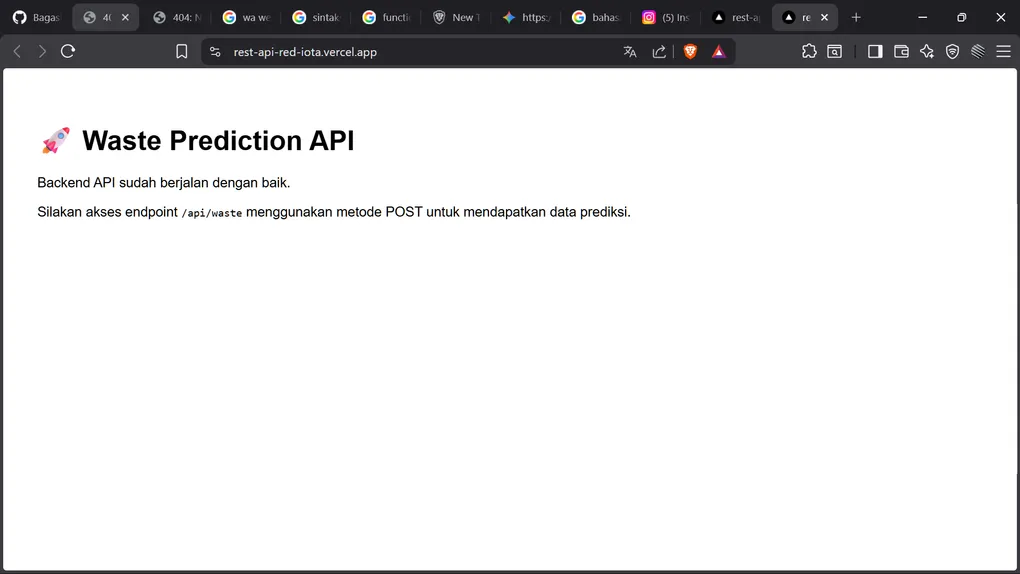
4️⃣ app/page.tsx - Home Page
export default function Home() {
  return (
    <div style={{ padding: '2rem', fontFamily: 'sans-serif' }}>
      <h1>🚀 Waste Prediction API</h1>
      <p>Backend API sudah berjalan dengan baik.</p>
      <p>Silakan akses endpoint <code>/api/waste</code>
         menggunakan metode POST untuk mendapatkan data prediksi.</p>
    </div>
  );
}
Purpose: Simple landing page untuk test server
🚀 Setup & Installation
Prerequisites
# Node.js 18+
node --version

# npm 10+
npm --version

# Git
git --version
Step 1: Clone Repository
git clone https://github.com/BagasHtml/rest_api.git
cd rest_api
Step 2: Install Dependencies
npm installIni akan install:
- Next.js & React
- Prisma & Database client
- TypeScript
- ESLint & Dev tools
- Tailwind CSS
Step 3: Environment Setup
# Copy environment file
cp .env.example .env

# Edit .env dengan credentials Anda
nano .env
Environment Variables:
# Database
DATABASE_URL="mysql://user:password@host:port/database"

# AI Service
API_URL="https://your-ai-service-api-endpoint"

# Node Environment
NODE_ENV="development"
Step 4: Initialize Database
# Generate Prisma client
npx prisma generate

# Create database & run migrations
npx prisma migrate dev --name init

# (Optional) Seed database dengan data sample
npx prisma db seed
Step 5: Development Server
# Start development server
npm run dev

# Server berjalan di: http://localhost:3000
# API endpoint: http://localhost:3000/api/waste
Step 6: Testing
# Test dengan cURL
curl -X POST http://localhost:3000/api/waste \
  -H "Content-Type: application/json" \
  -d '{"nama_lokasi": "JIS", "visitor_count": 80000}'

# Test dengan Postman
# 1. Create new POST request
# 2. URL: http://localhost:3000/api/waste
# 3. Body (JSON): {"nama_lokasi": "JIS"}
# 4. Send
📝 Development Guide
Code Style & Standards
TypeScript Best Practices:
// ✅ Good - Type everything
interface PredictionRequest {
  nama_lokasi: string;
  visitor_count?: number;
  event_name?: string;
}

async function handlePrediction(
  body: PredictionRequest
): Promise<PredictionResponse> {
  // ...
}

// ❌ Bad - Avoid any type
async function handlePrediction(body: any): Promise<any> {
  // ...
}
Prisma Best Practices:
// ✅ Good - Select specific fields
const area = await prisma.masterArea.findFirst({
  where: { name: location },
  select: { id: true, latitude: true, longitude: true }
});

// ❌ Bad - Select all fields
const area = await prisma.masterArea.findFirst({
  where: { name: location }
});
Error Handling:
// ✅ Good - Proper error handling
try {
  const data = await aiService.predict(payload);
  return NextResponse.json({ status: 'success', data });
} catch (error) {
  console.error('Prediction error:', error);
  return NextResponse.json(
    { status: 'error', message: error.message },
    { status: 500 }
  );
}

// ❌ Bad - Silent failures
const data = await aiService.predict(payload);
return NextResponse.json({ data });
Adding New Endpoints
Example: Create GET /api/areas endpoint
- Create folder structure:
app/api/areas/
└── route.ts- Implement handler:
// app/api/areas/route.ts
import { NextResponse } from "next/server";
import { prisma } from "@/app/lib/prisma";

export async function GET() {
  try {
    const areas = await prisma.masterArea.findMany({
      select: {
        id: true,
        name: true,
        latitude: true,
        longitude: true
      }
    });

    return NextResponse.json({
      status: 'success',
      data: areas
    });
  } catch (error: any) {
    return NextResponse.json(
      { status: 'error', message: error.message },
      { status: 500 }
    );
  }
}- Test:
curl http://localhost:3000/api/areasModifying Database Schema
- Edit prisma/schema.prisma:
model NewModel {
  id    Int     @id @default(autoincrement())
  name  String
}- Create migration:
npx prisma migrate dev --name add_new_model- Apply changes:
npx prisma generate🌐 Deployment
Deploy to Vercel (Recommended)
Step 1: Push to GitHub
git push origin mainStep 2: Connect to Vercel
1. Visit vercel.com
2. Import repository
3. Select project folder: rest_api
4. Configure environment variables
5. Deploy
Step 3: Set Environment Variables
In Vercel Dashboard:
DATABASE_URL = your_tidb_connection_string
API_URL = your_ai_service_endpoint
NODE_ENV = production
Step 4: Run Database Migrations
# Via Vercel CLI
vercel env pull
npx prisma migrate deploy
Alternative: Docker Deployment
Dockerfile:
FROM node:18-alpine

WORKDIR /app

# Copy package files
COPY package*.json ./

# Install dependencies
RUN npm ci --only=production

# Copy source
COPY . .

# Generate Prisma client
RUN npx prisma generate

# Build app
RUN npm run build

# Expose port
EXPOSE 3000

# Start server
CMD ["npm", "start"]
Build & Run:
docker build -t waste-api .
docker run -p 3000:3000 -e DATABASE_URL="..." waste-api
📚 Additional Resources
Documentation Links:
- Next.js 16 - https://nextjs.org/docs
- Prisma ORM - https://www.prisma.io/docs
- TypeScript - https://www.typescriptlang.org/docs
- TiDB - https://docs.pingcap.com/tidb
- Vercel - https://vercel.com/docs
Frontend Integration:
// Example: React component to call API
async function predictWaste(locationName: string) {
  const response = await fetch('/api/waste', {
    method: 'POST',
    headers: { 'Content-Type': 'application/json' },
    body: JSON.stringify({ nama_lokasi: locationName })
  });

  const result = await response.json();
  return result;
}
✅ Checklist Sebelum Kompetisi
- Semua environment variables sudah diset
- Database sudah terkoneksi dan migrate
- API endpoint sudah tested dengan Postman
- Error handling sudah comprehensive
- TypeScript tidak ada error
- ESLint rules sudah dipenuhi
- README dokumentasi lengkap
- Deployment ke Vercel berhasil
- Database backup sudah ada
- API response sesuai spesifikasi
🎯 Performance Tips
1. Database Query Optimization
// ✅ Good - Specific select
const area = await prisma.masterArea.findFirst({
  where: { name: location },
  select: { id: true, latitude: true }  // Only needed fields
});

// ❌ Bad - Select all
const area = await prisma.masterArea.findFirst({
  where: { name: location }
});
2. Caching Strategy
// Add caching headers untuk GET requests
export async function GET() {
  const response = NextResponse.json(data);
  response.headers.set('Cache-Control', 'public, s-maxage=60');
  return response;
}
3. Pagination untuk Large Results
// Implement pagination
const areas = await prisma.masterArea.findMany({
  skip: (page - 1) * 20,
  take: 20
});