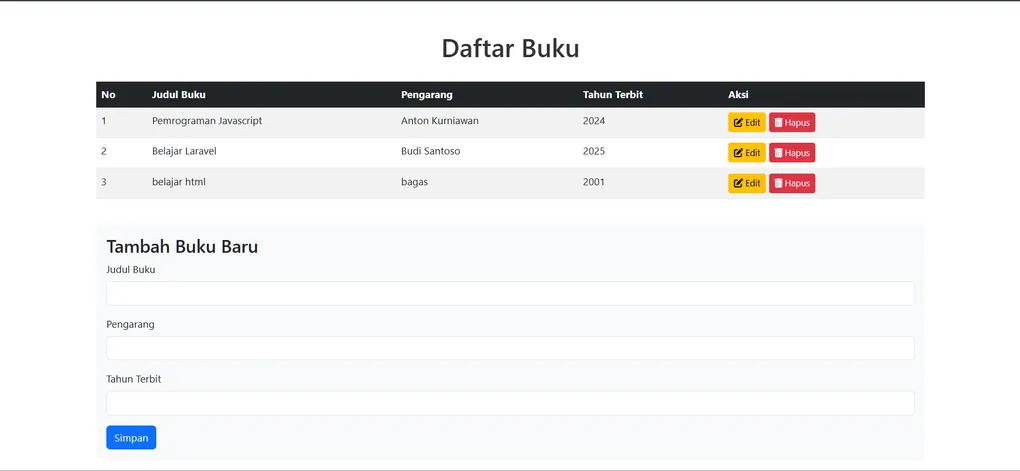
CRUD Library Book
Laravel CRUD Learning Project Documentation
Table of Contents
- Project Overview
- Features
- Technology Stack
- System Requirements
- Installation
- Project Structure
- Configuration
- Database Setup
- Running the Application
- API Endpoints
- CRUD Operations
- Troubleshooting
Project Overview
Belajar-Crud-Laravel is a learning project designed to demonstrate fundamental CRUD (Create, Read, Update, Delete) operations in Laravel. This project serves as an educational resource for developers who want to understand how to build basic web applications using the Laravel framework with proper database management practices.
The project follows Laravel’s best practices and conventions, making it an excellent reference for beginners and intermediate developers.
Features
- Create Operations: Add new records to the database with validation
- Read Operations: Retrieve and display data from the database
- Update Operations: Modify existing records
- Delete Operations: Remove records from the database
- Database Migrations: Organized database schema management
- Eloquent ORM: Object-oriented database interaction
- Blade Templating: Dynamic view rendering
- RESTful Routing: Standard HTTP method-based routing
- Form Validation: Input validation and error handling
Technology Stack
- Framework: Laravel (latest version)
- Language: PHP
- Database: MySQL/SQLite (configurable)
- Frontend: Blade Templates with HTML/CSS
- Build Tool: Vite
- Package Manager: Composer
- Testing: PHPUnit (pre-configured)
System Requirements
- PHP >= 8.1
- Composer
- Node.js >= 16
- MySQL or SQLite database
- Apache/Nginx web server (or use Laravel’s built-in server)
Installation
Step 1: Clone the Repository
git clone https://github.com/BagasHtml/Belajar-Crud-Laravel.git
cd Belajar-Crud-Laravel
Step 2: Install PHP Dependencies
composer installStep 3: Install Node Dependencies
npm installStep 4: Create Environment File
cp .env.example .envStep 5: Generate Application Key
php artisan key:generateStep 6: Configure Database
Edit the .env file with your database credentials:
DB_CONNECTION=mysql
DB_HOST=127.0.0.1
DB_PORT=3306
DB_DATABASE=laravel_crud
DB_USERNAME=root
DB_PASSWORD=
Step 7: Run Migrations
php artisan migrateProject Structure
Belajar-Crud-Laravel/
├── app/                    # Application code
│   ├── Http/              # HTTP controllers and middleware
│   │   └── Controllers/   # Application controllers
│   ├── Models/            # Eloquent models
│   └── ...
├── bootstrap/             # Framework bootstrap files
├── config/                # Configuration files
├── database/
│   ├── migrations/        # Database migration files
│   ├── factories/         # Model factories for testing
│   └── seeders/           # Database seeders
├── public/                # Public assets (CSS, JS, images)
├── resources/
│   ├── views/             # Blade template files
│   ├── css/               # Stylesheets
│   └── js/                # JavaScript files
├── routes/                # Route definitions
│   ├── web.php            # Web routes
│   └── api.php            # API routes (if applicable)
├── storage/               # Logs, uploads, caches
├── tests/                 # Test files
├── .env.example           # Environment variable template
├── composer.json          # PHP dependencies
├── package.json           # Node dependencies
├── artisan                # Laravel CLI
└── vite.config.js         # Vite configuration
Configuration
Database Configuration
Configure your database in the .env file:
DB_CONNECTION: Database driver (mysql, sqlite, pgsql)DB_DATABASE: Database nameDB_USERNAME: Database userDB_PASSWORD: Database password
Application Configuration
Other important .env settings:
APP_NAME: Application nameAPP_ENV: Environment (local, production)APP_DEBUG: Debug mode (true/false)APP_URL: Application URL
Database Setup
Create Database
mysql -u root -p
CREATE DATABASE laravel_crud;
EXIT;
Run Migrations
Migrations define the database schema:
php artisan migrateRun Seeders (Optional)
Populate database with sample data:
php artisan db:seedRollback Migrations
To undo migrations:
php artisan migrate:rollbackRunning the Application
Development Server
Start Laravel’s built-in development server:
php artisan serveThe application will be accessible at http://localhost:8000
Build Assets
Compile frontend assets with Vite:
npm run dev      # Development mode with hot reload
npm run build    # Production build
API Endpoints
Standard CRUD Endpoints
| Method | Endpoint | Action | Description |
|---|---|---|---|
| GET | /items | index | Display all items |
| GET | /items/{id} | show | Display single item |
| GET | /items/create | create | Show create form |
| POST | /items | store | Store new item in database |
| GET | /items/{id}/edit | edit | Show edit form |
| PUT/PATCH | /items/{id} | update | Update item in database |
| DELETE | /items/{id} | destroy | Delete item from database |
Note: Replace items with your actual resource name
CRUD Operations
Create (C)
To create a new record:
- Access the create form:
GET /items/create - Submit form data:
POST /items - Redirects to show page after successful creation
Read (R)
Retrieve records:
- List all:
GET /items→ displays all records - View single:
GET /items/{id}→ shows specific record
Update (U)
Modify existing records:
- Access edit form:
GET /items/{id}/edit - Submit changes:
PUT/PATCH /items/{id} - Database updated and redirects to show page
Delete (D)
Remove records:
- Send
DELETE /items/{id}request - Record removed from database
- Redirects to list page
File Naming Conventions
- Controllers: Singular, PascalCase (e.g.,
ItemController.php) - Models: Singular, PascalCase (e.g.,
Item.php) - Migrations: Snake_case with timestamp (e.g.,
2024_01_15_create_items_table.php) - Views: Lowercase with dots for nesting (e.g.,
items.index,items.create) - Routes: RESTful naming convention
Common Artisan Commands
# Generate new controller
php artisan make:controller ItemController --resource

# Create a model with migration
php artisan make:model Item -m

# Create migration
php artisan make:migration create_items_table

# List all routes
php artisan route:list

# Clear cache
php artisan cache:clear

# Run tests
php artisan test

# Generate IDE helper for better autocomplete
php artisan ide-helper:generate
Troubleshooting
Database Connection Error
- Verify database credentials in
.env - Ensure database server is running
- Check database name exists
Migration Errors
# Check migration status
php artisan migrate:status

# Rollback and retry
php artisan migrate:rollback
php artisan migrate
Missing Key Error
php artisan key:generateAsset Not Found
npm install
npm run dev
Permission Denied Errors
chmod -R 775 storage bootstrap/cachePort Already in Use
# Use different port
php artisan serve --port=8001
Best Practices
- Always validate user input in controllers and forms
- Use meaningful variable names for clarity
- Follow Laravel naming conventions consistently
- Write database queries using Eloquent ORM when possible
- Use migrations for database schema changes
- Implement proper error handling and logging
- Write tests for critical functionality
- Keep controllers lean - move logic to models or services
- Use environment variables for sensitive data
- Regularly commit changes with clear messages
Learning Resources
- Laravel Official Documentation
- Laravel Blade Templates Guide
- Eloquent ORM Documentation
- Laravel Migrations
- Laravel Testing
Support & Contributions
For questions or issues, please refer to the Laravel Documentation or open an issue in the repository.
To contribute to this learning project, fork the repository and submit a pull request with your improvements.
License
This project is open-sourced software licensed under the MIT license.