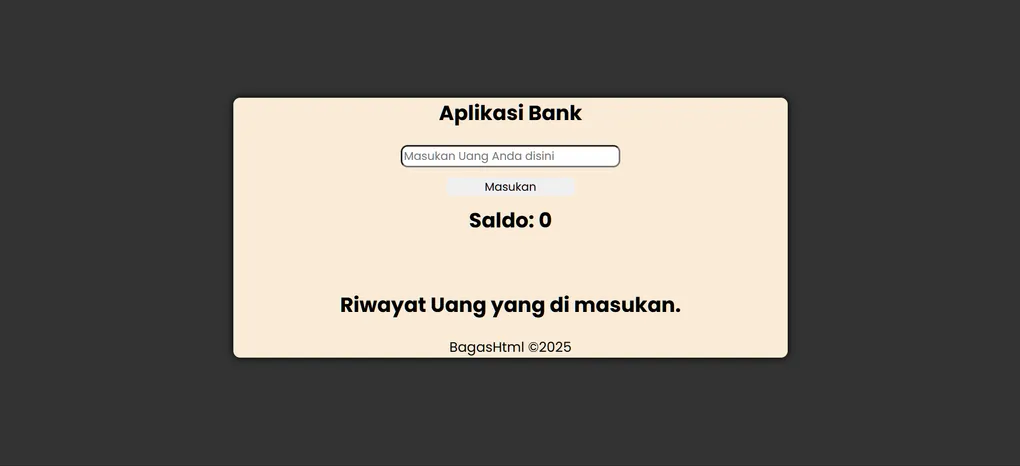
Bank Application
Project Overview
Aplikasi-Bank is a modern web-based banking application built with HTML, CSS, JavaScript, and TypeScript. This application provides users with essential banking functionalities in an intuitive and responsive interface.
Repository: BagasHtml/Aplikasi-Bank
Live Demo: aplikasi-bank.vercel.app
Technology Stack
| Technology | Purpose | Version |
|---|---|---|
| HTML | Markup & Structure | 5 |
| CSS | Styling & Layout | 3 |
| JavaScript | Dynamic Functionality | ES6+ |
| TypeScript | Type-Safe Development | Latest |
Project Structure
Aplikasi-Bank/
├── index.html          # Main HTML file
├── design.css          # Stylesheet
├── Bank.js             # JavaScript implementation
├── Bank.ts             # TypeScript implementation
└── README.md           # Project information
File Descriptions
index.html
- Contains the HTML structure of the banking application
- Defines all user interface elements and forms
- Semantic markup for better accessibility
design.css
- Responsive styling for all components
- Modern UI/UX design principles
- Mobile-friendly layout
Bank.js
- Core banking application logic in JavaScript
- Handles business logic and calculations
- User interaction management
Bank.ts
- TypeScript version of the banking logic
- Type definitions for better code safety
- Enhanced development experience with static typing
Features
Core Banking Features
- Account creation and management
- Balance checking
- Money transfer functionality
- Transaction history
- User authentication
User Interface
- Responsive design supporting all devices
- Intuitive navigation
- Modern styling with CSS
- Real-time form validation
Getting Started
Prerequisites
- Modern web browser (Chrome, Firefox, Safari, Edge)
- Node.js (optional, for TypeScript compilation)
- Git (for cloning the repository)
Installation
- Clone the repository:
git clone https://github.com/BagasHtml/Aplikasi-Bank.git
cd Aplikasi-Bank- Open the application:
# Using a simple HTTP server
python -m http.server 8000
# Or use any other local server- Navigate to your browser:
http://localhost:8000Usage Guide
Basic Operations
Creating an Account
- Open the application in your browser
- Fill in the required information in the sign-up form
- Click the “Create Account” button
- Your account will be created with an initial balance
Checking Balance
- Log in to your account
- Navigate to the dashboard
- Your current balance will be displayed
Transferring Money
- Go to the transfer section
- Enter the recipient’s account number
- Specify the amount
- Confirm the transaction
- Transaction will be processed and recorded
Viewing Transaction History
- Access the transaction history page
- View all past transactions with dates and amounts
- Filter transactions by date or type if available
Code Architecture
JavaScript/TypeScript Structure
The application follows object-oriented principles with a main Bank class that handles:
- Account management
- Balance calculations
- Transaction processing
- User data storage
- Business logic validation
Key Classes and Methods
Bank Class
- Constructor: Initialize bank instance
- createAccount(): Create new user account
- getBalance(): Retrieve account balance
- transfer(): Execute money transfer
- getTransactionHistory(): Retrieve transaction records
- authenticate(): Verify user credentials
Responsive Design
The application is fully responsive and optimized for:
- Desktop: 1920px and above
- Tablet: 768px - 1024px
- Mobile: Below 768px
CSS media queries ensure optimal viewing experience across all devices.
Browser Compatibility
| Browser | Support |
|---|---|
| Chrome | ✓ Full Support |
| Firefox | ✓ Full Support |
| Safari | ✓ Full Support |
| Edge | ✓ Full Support |
| IE 11 | ✗ Not Supported |
Security Considerations
While this is a demonstration/educational application, production use should implement:
- Backend Validation: All inputs must be validated on the server
- Encryption: Sensitive data should be encrypted in transit (HTTPS)
- Authentication: Implement secure session management
- Data Protection: Use secure storage for sensitive information
- Input Sanitization: Prevent XSS attacks through proper input handling
Development
TypeScript Setup
If you want to work with TypeScript:
- Install TypeScript globally:
npm install -g typescript- Compile TypeScript:
tsc Bank.ts --outFile Bank.jsCode Style
- Follow consistent naming conventions
- Use meaningful variable and function names
- Add comments for complex logic
- Maintain clean, readable code structure
Performance Optimization
Current optimizations include:
- Minimal CSS and JavaScript files
- Efficient DOM manipulation
- Local storage for user data persistence
- Optimized asset loading
Future Improvements
- Implement caching strategies
- Minify CSS and JavaScript for production
- Lazy load components where applicable
- Use service workers for offline functionality
Deployment
The application is currently deployed on Vercel:
Live URL: aplikasi-bank.vercel.app
Deploying Your Own Version
- Push code to GitHub
- Connect repository to Vercel
- Configure build settings
- Deploy automatically on push
# Manual deployment using Vercel CLI
npm install -g vercel
vercel
Troubleshooting
Application Won’t Load
- Clear browser cache
- Disable browser extensions
- Try a different browser
- Check browser console for errors
Styling Issues
- Ensure design.css is properly linked
- Check for CSS file path errors
- Clear CSS cache
- Verify media query breakpoints
JavaScript Errors
- Open browser developer console (F12)
- Check for JavaScript errors
- Verify all functions are properly defined
- Ensure Bank.js is loaded before execution
Contributing
To contribute to this project:
- Fork the repository
- Create a feature branch (
git checkout -b feature/amazing-feature) - Make your changes
- Commit your changes (
git commit -m 'Add amazing feature') - Push to the branch (
git push origin feature/amazing-feature) - Open a Pull Request
Future Roadmap
- Add bill payment functionality
- Implement loan management system
- Add investment portfolio features
- Create mobile app version
- Implement advanced analytics
- Add multi-language support
- Integrate with payment gateways
- Add two-factor authentication
License
This project is open source and available under the MIT License.
Contact & Support
For questions or support:
- GitHub Issues: BagasHtml/Aplikasi-Bank/issues
- GitHub Profile: @BagasHtml
Changelog
Version 1.0.0 (Initial Release)
- Core banking functionality
- User authentication
- Balance management
- Transaction history
- Responsive design
- Deployed on Vercel
Glossary
| Term | Definition |
|---|---|
| Account | User profile with balance and transaction history |
| Balance | Available funds in user account |
| Transfer | Moving funds from one account to another |
| Transaction | Record of account activity (deposit/withdrawal) |
| TypeScript | JavaScript with static type definitions |
| Vercel | Cloud platform for deploying web applications |